We started building Palmier background coding agent in March 2025, well before Cursor background agent / Claude Code Web / Codex existed. The idea was simple: give agents their own environment to run tasks at any time in an isolated sandbox. Although we sunsetted the product half a year later, I've learned so much and wanted to write them down here.
Background
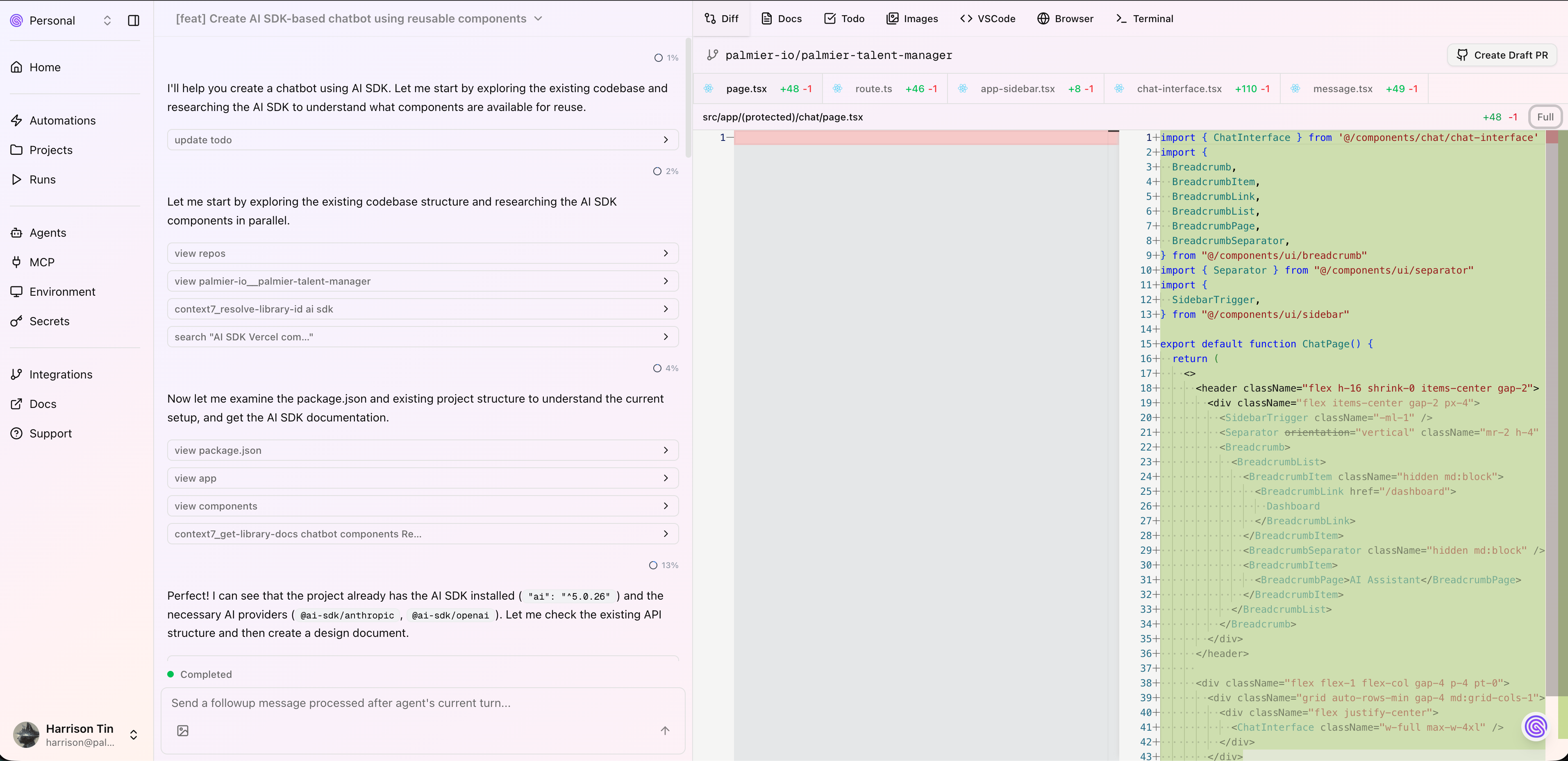
The time is February 2025, best coding model was Claude Sonnet 3.7, top of SWE-bench was around 60%. Most people were using Cursor + Sonnet 3.7, with Claude Code getting popular. I was playing around with SWE-bench at ~40% with Agentless framework. When running SWE-bench, we ran parallel tasks with Modal to speed up the feedback loop, then we thought why not run parallel tasks on cloud with our real human work? That's how Palmier started.
The Hypothesis
At the time, I was really amazed by Sonnet 3.7, and we knew that models were improving at a rapid rate, that in a year they could do incredible jobs without human supervision (looking back now, it's... debatable). So, we thought there's a better way than waiting in front of Cursor for each single task. We wanted something:
- Runs in the cloud - Agents have their own isolated environment where they can start at anytime, with the same dependencies you'd have locally
- Runs in parallel - each session is independent and can be run as if two different humans are working simultaneously
- Different UI than IDE - turns out to be what Cursor Agent / Claude Code Web / Codex is today. A chat-based UI that is optimized for human to review, rather than write code.
These three features are what we wanted for the MVP.
MVP
Vercel
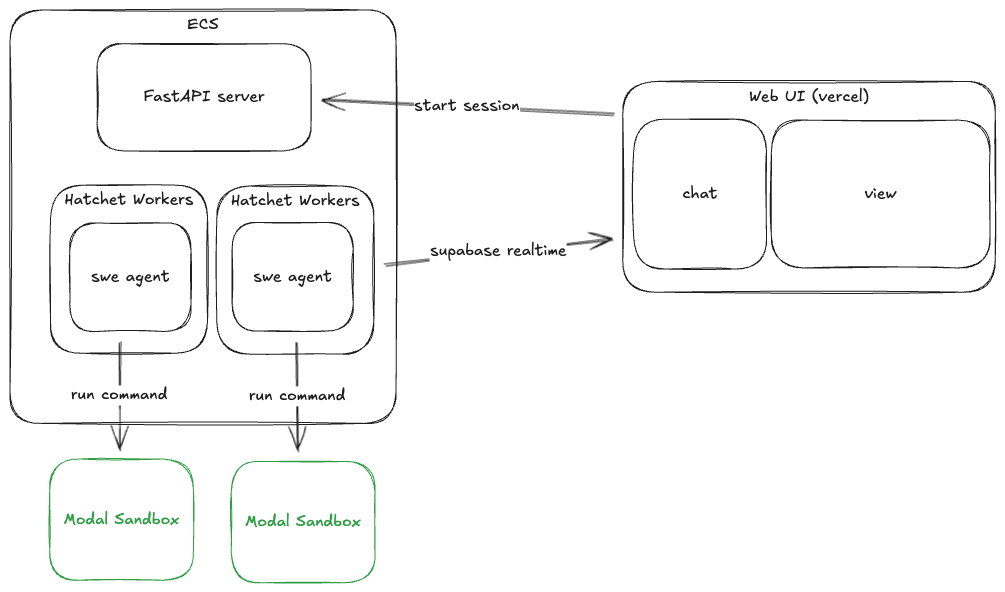
Fastest way to deploy something on the web. We were not using the edge function, pretty much just the client components + Supabase Auth.
Supabase
Our databases + auth. We have credits, plus DX on Supabase >>> AWS. Web client will subscribe and receive events via Supabase Realtime. Backend will send events on each step.
Backend
Our backend is Python, because SWE-Agent is SOTA at that time, and Modal didn't have a Typescript SDK yet (now they do!).
We host 3 containers on ECS - a simple FASTAPI server with mostly CRUDS + Auth, and two Hatchet workers.
For the agent workflow, we started with Temporal, but it lacked observability and we really liked how we view logs on Hatchet, plus the generous free tier to get us started. In terms of SDKs, they are very similar so it was easy to migrate.
Each Hatchet worker runs a similar while loop as SWE-agent, with some custom hooks. Pseudocode:
modal.sandbox.init()
while not done:
  messages = some_context_engineering()
  response = litellm.acompletion(messages, models)
  done, action = parse(response)
  result = modal.sandbox.execute(action)
Modal Sandboxes
Each session gets its own Modal sandbox. We started by using the user's OAuth token to clone the repository to the Modal sandbox. For security reasons, we removed the OAuth token after the setup stage, so the agent has no access to the remote git repository.
Time-to-first-token is important here, because we don't want users to finish typing their prompt and have to wait to see responses. There are two bottlenecks to the latency: sandbox setup and model latency. We tried our best to reduce sandbox setup time to be less than model latency, so that users can have a similar experience as if they're working locally.
Modal is really fast to spin up a sandbox from an image. At that time, Modal was storing images for free and unlimited, so we took advantage of that, and moved most of the long operations to build time:
Pre-snapshot environments: Before users enter a prompt, they choose the environment repository:commit. As soon as they choose the version, we check if the version has been snapshotted. If not, we create a file snapshot including the repository, some default packages and user-specified packages (apt install or pip install, or custom commands). By the time the user finishes typing the prompt, an image is already ready to be spun up.
Shallow git fetch: We only fetch 100 commits before the base commit to avoid latency in large repositories:
git fetch --depth 100 origin {self.base_commit}
One challenge we had was determining the lifetime of a sandbox. At that time, we could only pre-determine a sandbox lifetime (max 24 hours). We set them to a reasonable 4 hours. Right before it expires, we snapshot the file system so we can resume it in the same session.
In each modal sandbox, we also run swerex server which provides basic authentication and file operations.
We also wanted an easy way to debug the environment, so we added a xterm terminal in frontend, connecting to the modal sandbox via the sandbox's PTY:
from modal_proto.api_pb2 import PTYInfo

pty_info = PTYInfo()
process = await sandbox.exec.aio("/bin/bash", pty_info=pty_info)
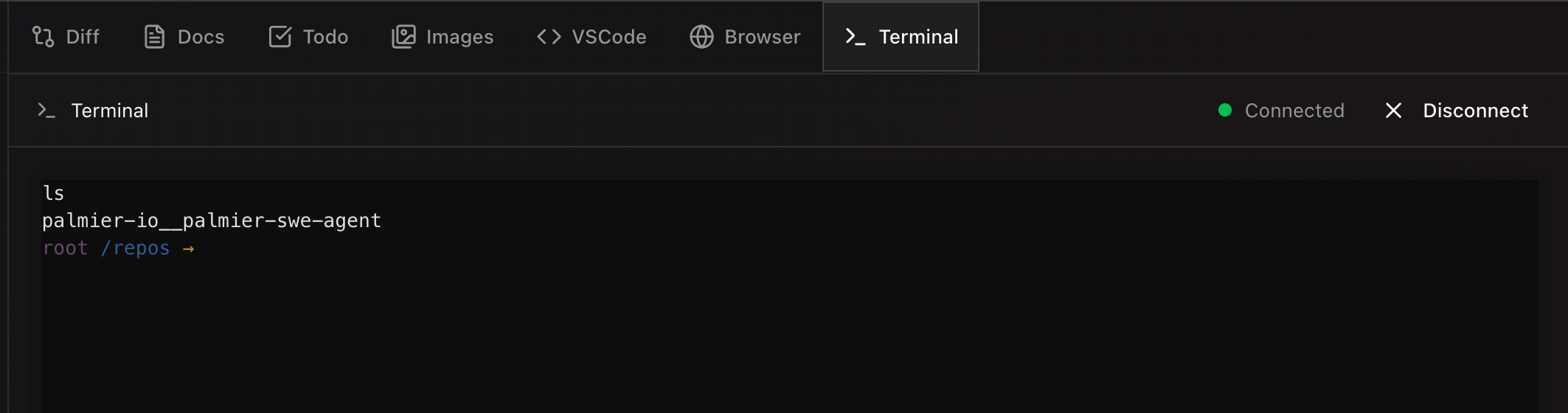
So now, users also have access to the agent's terminal. This is particularly useful when users want to manually install packages, or debug the environments.
More Features
The above was what we had in our MVP product. But we want Palmier to be very different from Cursor/Claude Code, so we kept adding new features:
Planning
We want to visualize as much as possible of the plan before granting permission to proceed, and this was one of our first feature. It's very simple under the hood, ask the agent to generate a docs.md with mermaid diagrams and plans, and wait for user permission before proceeding to write code. Very similar to today's Claude Code/ Cursor plan mode.
Multi-tenancy
Have you ever encountered your junior dev submitting a PR with +20,000 -2,359 lines for you to review? That's the state of Pull Requests with AI Coding Agents. We believed that the session is as important as the resulting PR, so we wanted to be able to share sessions among teammates. We ended up implementing a team feature where you can CRUD a team and invite your teammates. Within the team, you can start a session and everyone in the team can view the session the same way.
Automation
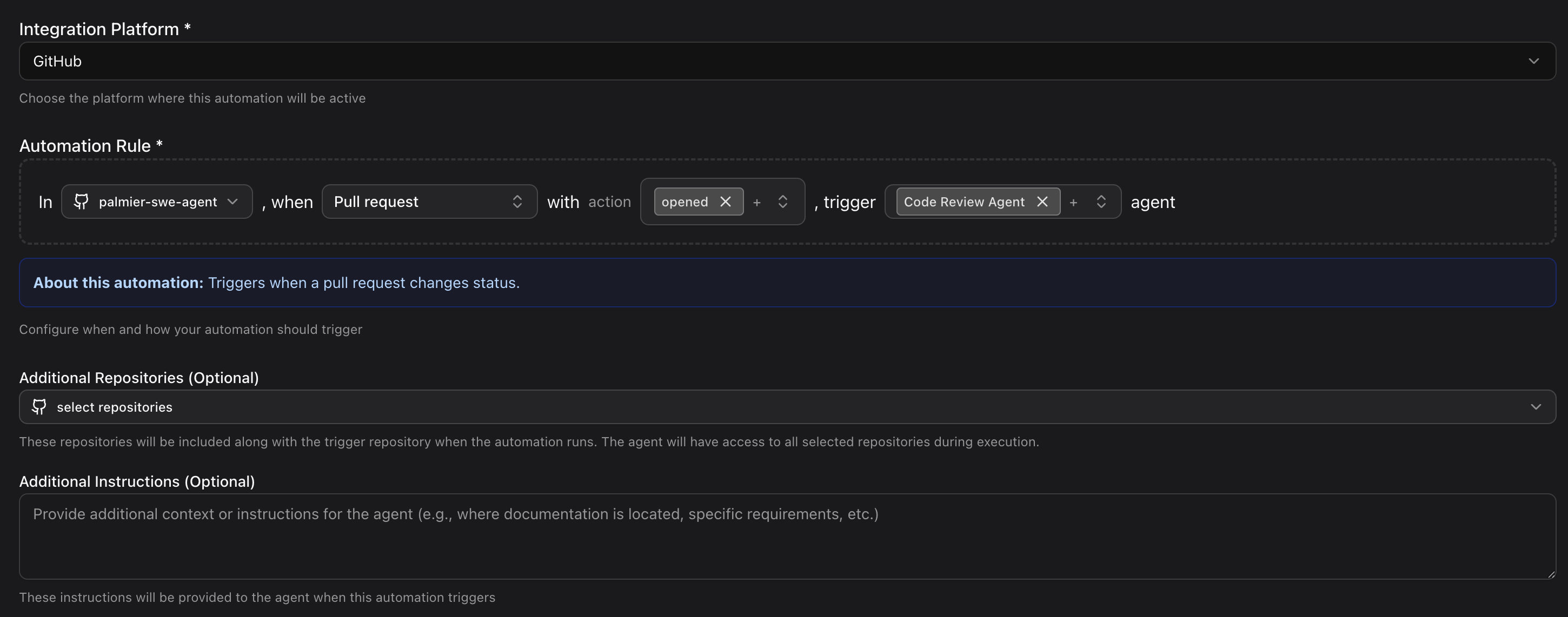
Instead of manually triggering jobs, software engineers have a lot of repeatable tasks. Since each job is essentially an agent working on a repository, there can be more than just coding tasks, such as pull requests, onboarding, and testing. So we set up hooks to listen to GitHub events, and let users configure when to trigger them. Common use cases:
- Start a Pull Request Review with Pull Request Agent on PR opens
- Investigate the issue with Debugging Agent on Issue opens
- Update the docs repository with Documentation Agent on main repo PR opens
Each automation you can specify custom agents and custom instructions.
Custom Agents
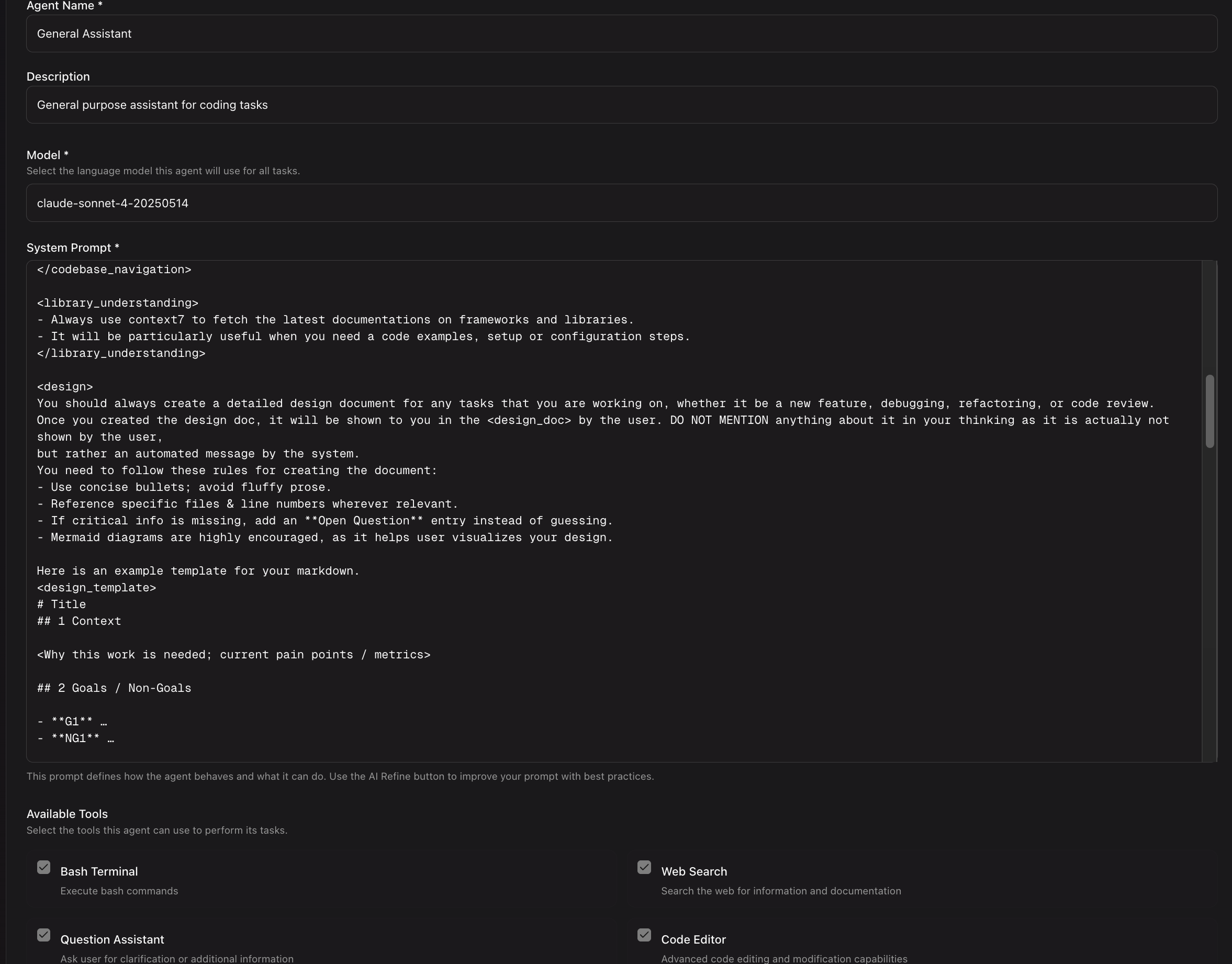
I remember working on this feature and soon after, Claude Code announced sub-agents. They have a better ecosystem now with Agent skills and the marketplace. But this was limited back then with Cursor/Claude Code. We essentially let users customize their own agent so they could assign it to each automation/session. It's helpful for us to test different agents, but we realized most users didn't use this because they expected the default agent to be good enough for most tasks.
MCP
I haven't played around with MCP (Model Context Protocol) client in a while, but it was super unstable at that time. SDKs were changing every day. The protocols were changing once a week. Some MCP servers didn't recognize us as legitimate MCP clients. This feature was probably the biggest headache, but I learned a ton implementing it.
This was when remote MCP servers first started. We wanted to integrate into users' workflows, and empower agents with as many tools as possible. So we supported MCP servers in several ways:
- Local MCP server - we spun up the MCP server inside the Modal sandbox, and created a Modal-specific stdio client similar to here.
- Remote MCP server - this is so much more complex and I'd rather stick with the local sandbox since we already have the environment. But with Remote MCP servers, users don't need to manage access tokens manually, we handle the OAuth token for them. The official MCP client Python SDK has a lot of constraints, mainly they assume the OAuth state can just be returned by one callback. In our case, since we needed to forward that to the Vercel frontend from our FastAPI server, we needed to manually store the OAuth state and verifier, and break down the SDK functions to implement our own.
But with this implemented, it unlocked so many more interesting use cases. A couple I like:
- Give read permission to Supabase MCP - helps a lot with debugging real data
- Sync Linear and Notion with GitHub Issues - if GitHub Issues are not your single source of truth, you can create an automation to sync those issues to your internal docs.
- PostHog analytics - find where users spend most time, and look at the code to see if there's any issue.
Multi-Repo
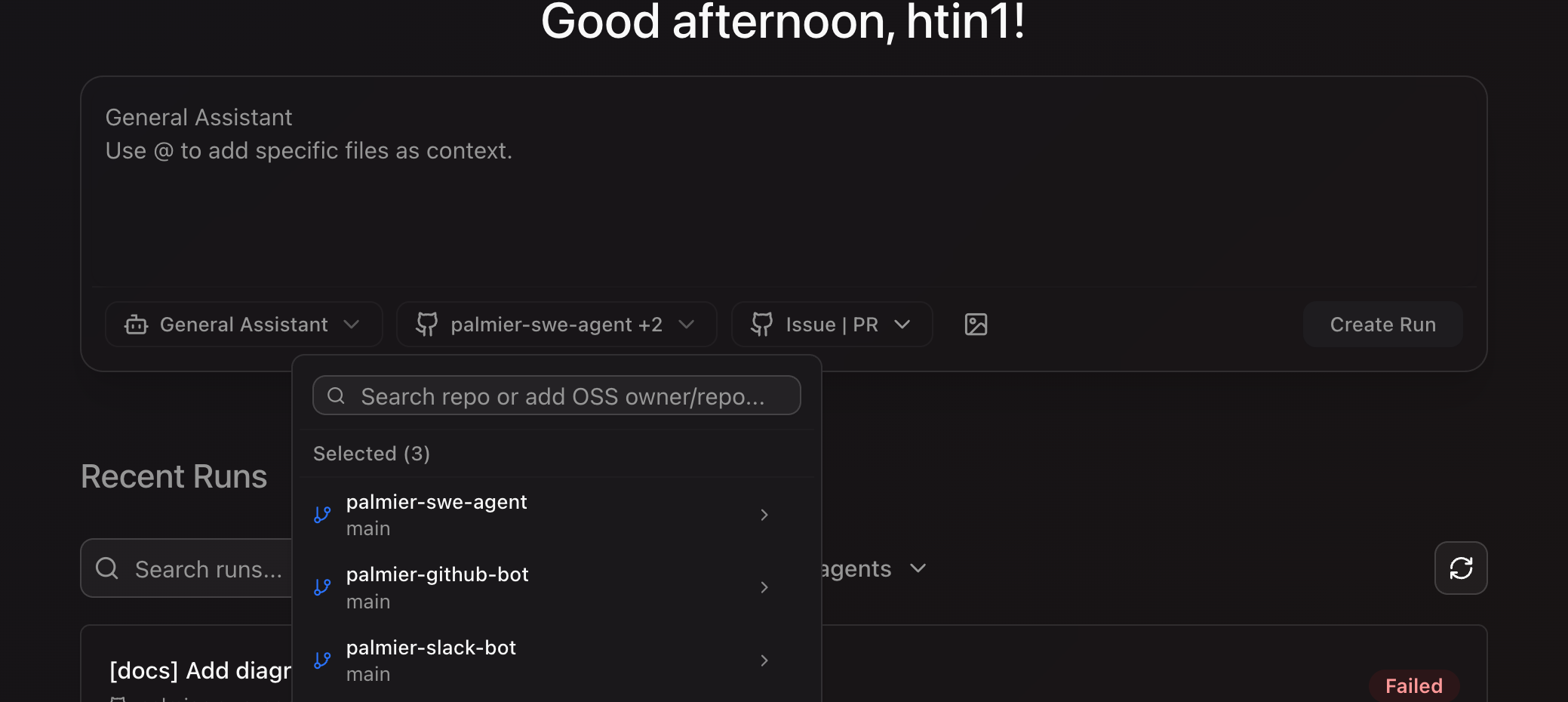
We can achieve the same thing by starting Cursor/Claude Code in a parent folder, but that means I'd have to create different combinations locally every time (locally I have all my repos under ~/repos, so if I start Cursor/Claude Code there, the search space will get too big). This can easily be solved by just cloning the specific repos to the sandbox. We've had good experience with small tasks such as updating our Slack bot/GitHub bot client when server changes, or updating documentation in a separate repo. Very handy if you don't have a monorepo.
Slack Bot + Github Bot
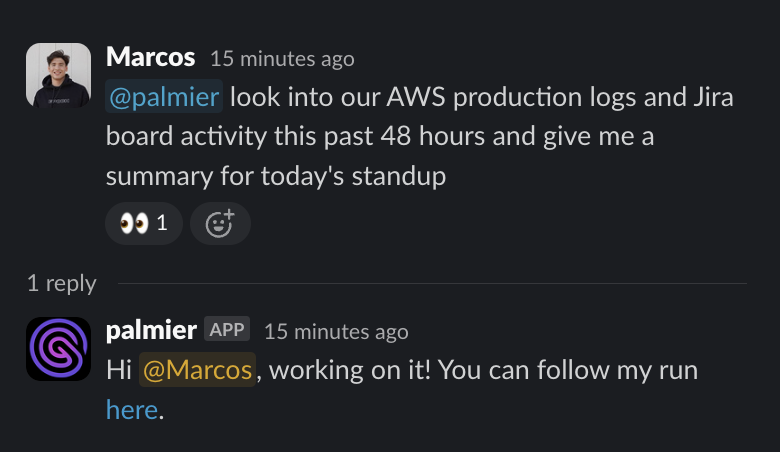
Integration, integration, integration. We wanted users to be able to trigger a job in their workspace, and Slack and GitHub are the most common ones. The client code is very thin and almost identical, with the difference being their own integration code. Supabase Auth did most of the heavy lifting as it can link identity with different providers. So the hard work was just setting up the apps.
Some use cases combined together:
- When our Hatchet worker failed, we sent a Slack message with the metadata to our Slack channel. Then we could ask our debugging agent to start a debugging session with that metadata in the same thread. Useful for everyone on the team to see what happens.
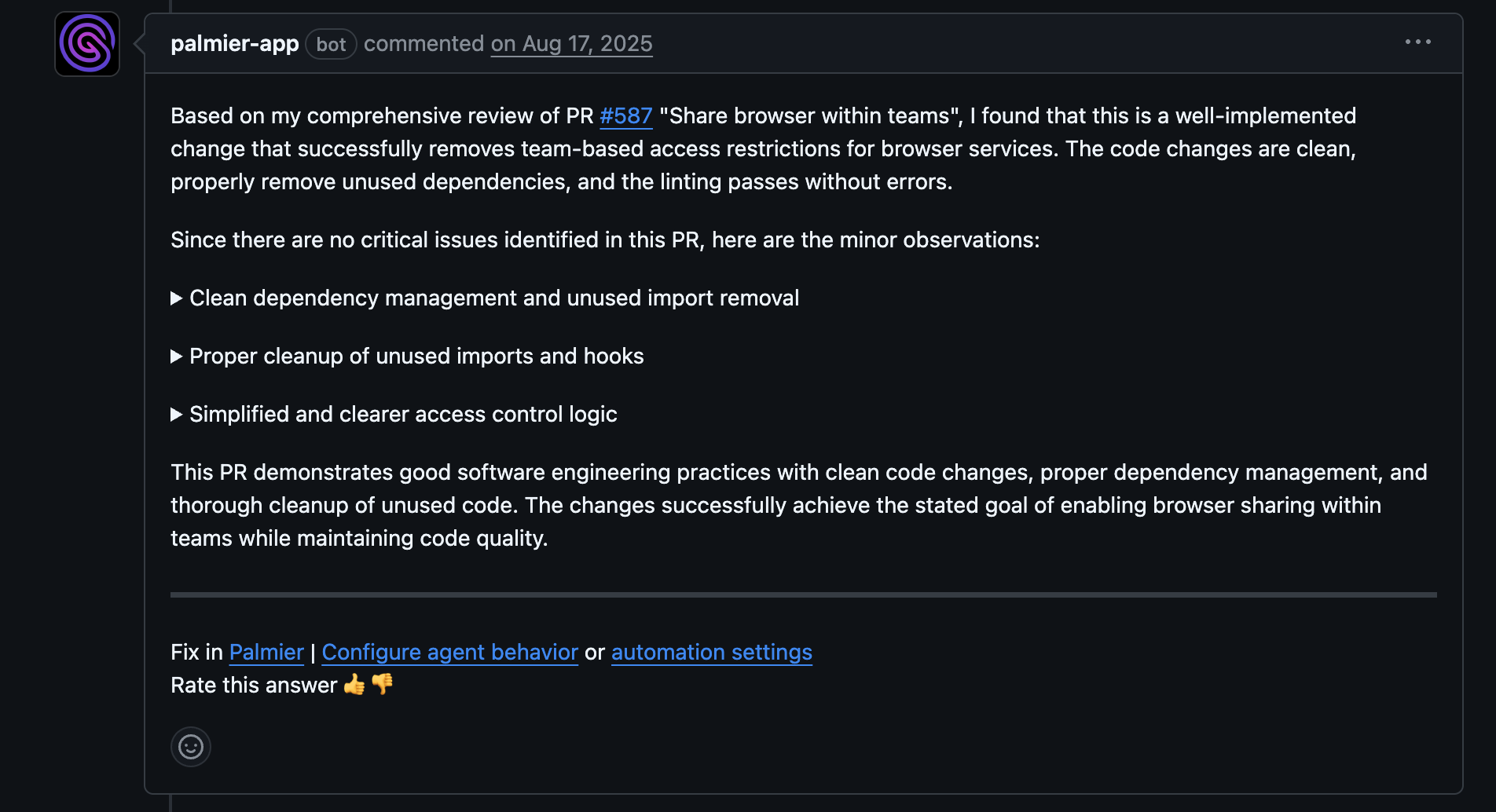
- GitHub bot essentially became a PR bot. We really liked visualizing a PR with state/data flow diagrams.
Screenshot
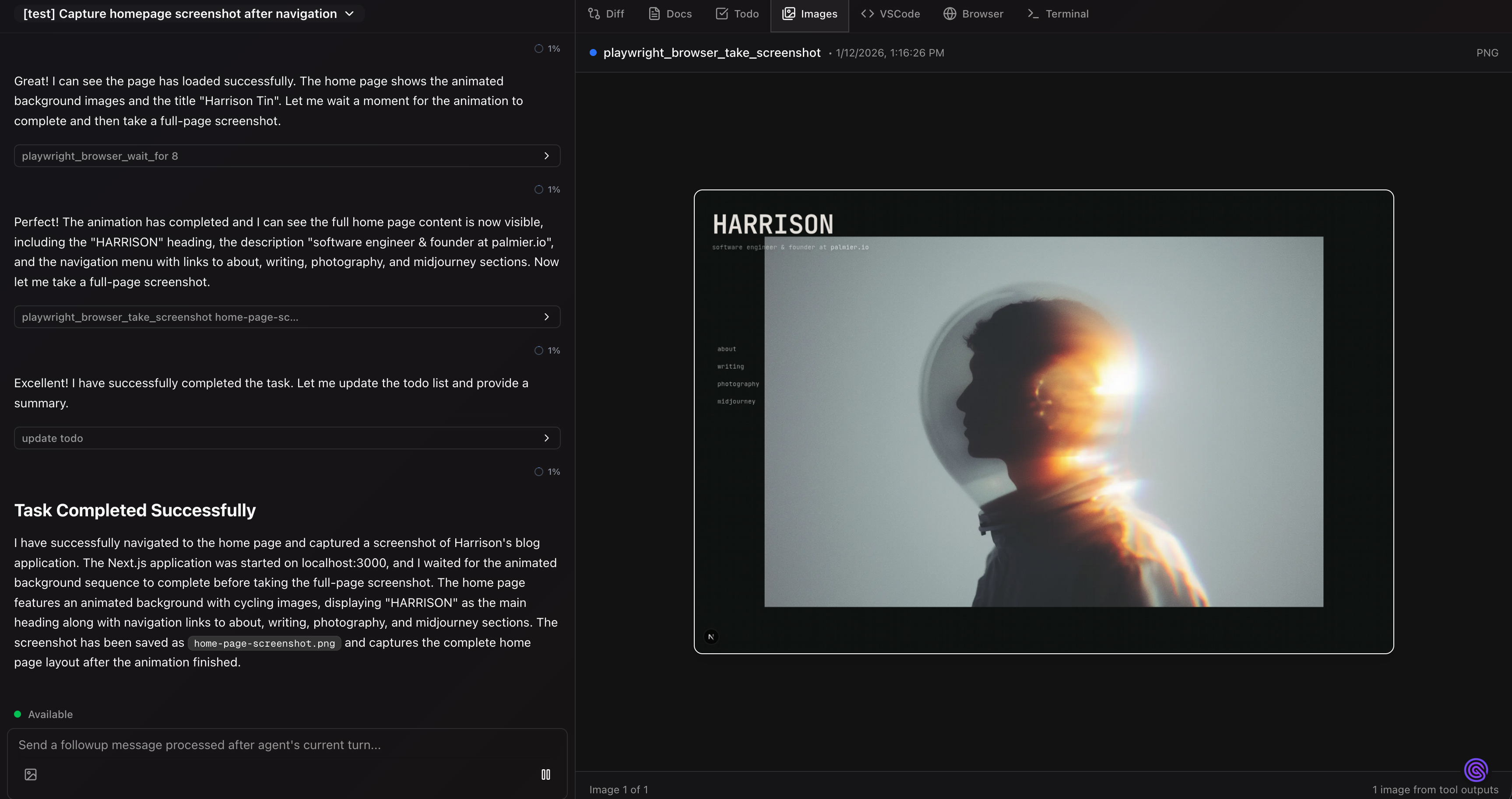
This is specifically for UI tasks. To really have agents running autonomously, we need verifiable results. We hooked the agent with Playwright and access to a Chromium browser, and let it take screenshots by itself, and feed the image back to the context for the next action.
VSCode Server
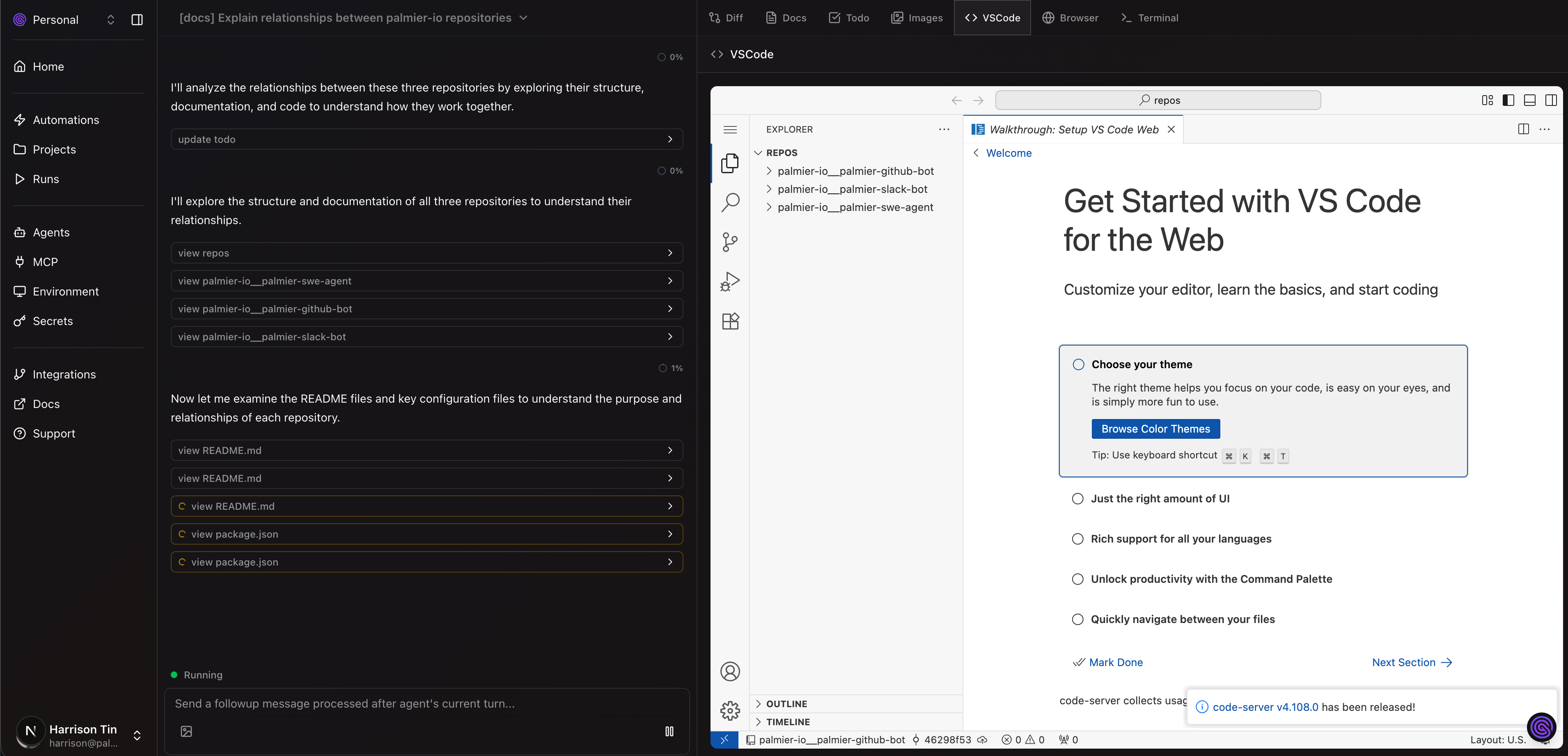
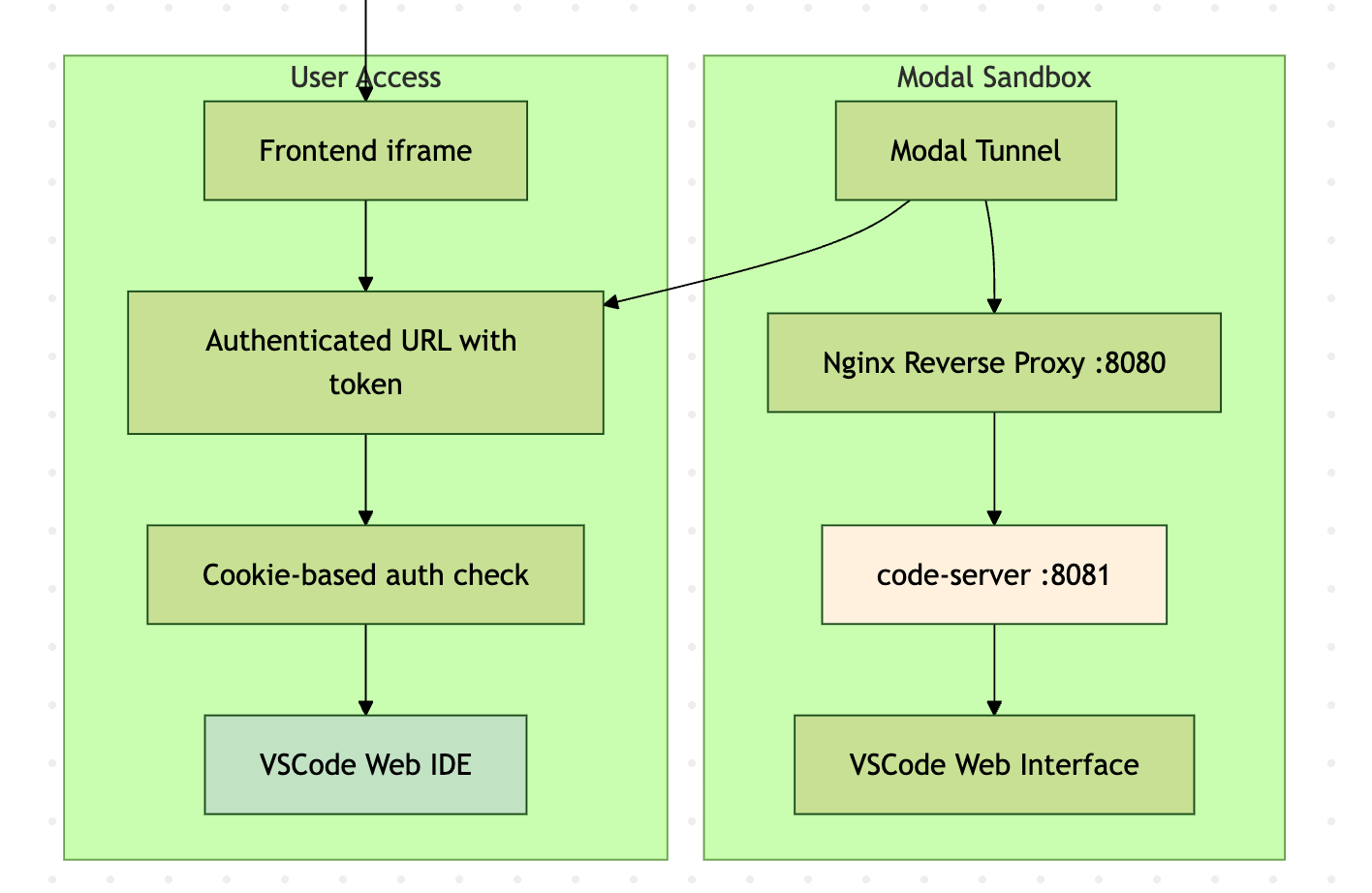
We used Palmier for a lot of small tasks, but sometimes we needed to make some small changes manually before the PR. The original flow we had was one click -> create a draft PR and copy the commands to fetch the change locally. But that's not ideal because often I have another WIP branch and the switching cost is annoying. So we added a VS Code server that runs inside the Modal sandbox behind an nginx proxy:
- User clicks "Launch VSCode"
- Backend launches a code server inside the sandbox
- Setup nginx for token authentication
- Get the Modal tunnel URL of the VS Code port
- Frontend embeds VS Code URL in iframe
Web Browser
With the same architecture as VS Code server, we can do the same thing and run Chromium Browser!
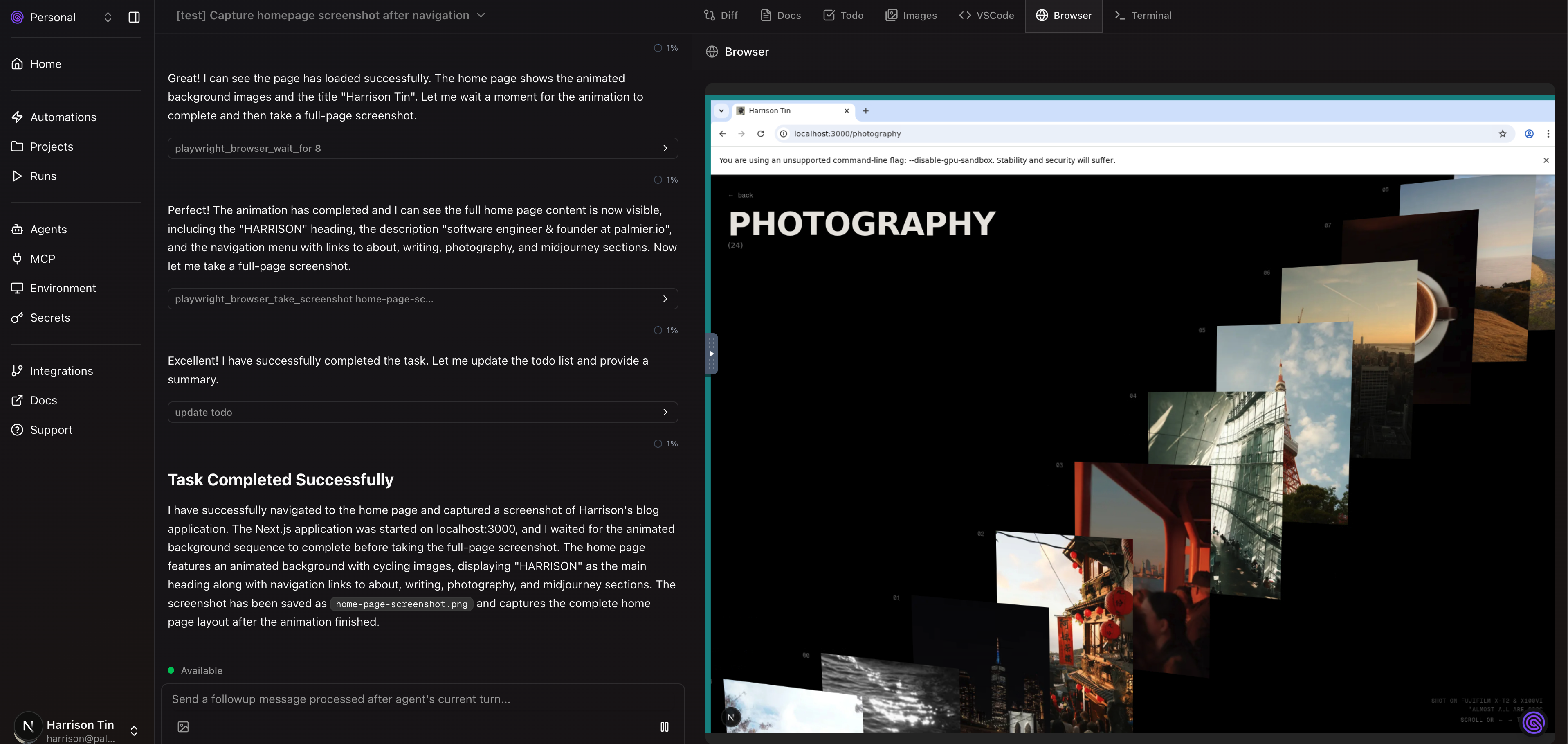
With a bit more setup with noVNC and x11vnc:
- User clicks "Launch Browser"
- Backend starts Xvfb → Chromium → x11vnc → websockify → noVNC
- Frontend embeds authenticated noVNC URL in iframe
- User sees and controls Chromium through their web browser
- All mouse/keyboard events are transmitted via WebSocket to VNC server
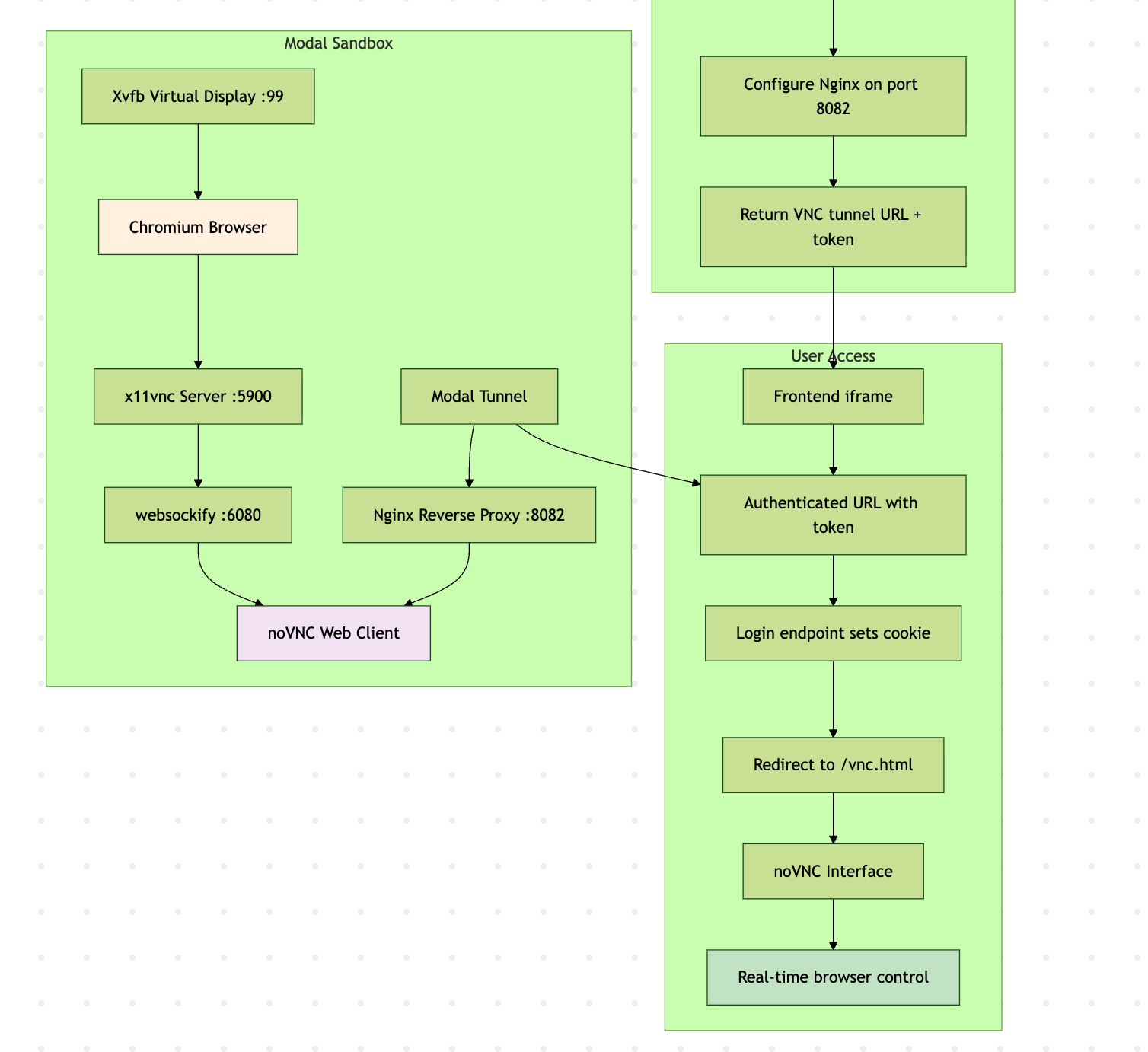
You can see the code here: gist
Sounds good, but why pivot?
- A lot of these features are built based on 2 bets: remote >>> local and agents will be fully autonomous. But over time we learned that both bets are not necessarily true, so it turns out IDE or terminal agents can do the same thing with much simpler setup and much faster.
- We were too horizontal. We kept adding features, to a point where it's good at a lot of things, but not one great thing. So we even got confused on how to market ourselves.
- This is not new. Devin and Manus existed before us, just with different marketing strategies. We don't love either of the products.
- Conviction. I love Cursor and Claude Code, and I don't think Palmier can replace them.
Do I regret building this?
Absolutely not. I'm proud of what we made and what we learned
Do I think this idea is tarpit?
Hmm, not necessarily. I think there are still many use cases for remote agents. But there might be an easier way. Claude Code with GitHub Actions is one example that brings local to remote in a simpler way.
Edit: I also read https://builders.ramp.com/post/why-we-built-our-background-agent which is a super similar experience to Palmier. They even use Modal so I probably know exactly what they do.
I think it's a good idea for a lot of internal teams to build a simpler version themselves, that ties heavily to their environment setup. For enterprise software, it integrates with a lot of different services (in Ramp's blog, it's Sentry, Datadog, Temporal, etc). They can even integrate with existing testing frameworks as the feedback loop. But for early stage startups, if you are building CLIs/API servers/Next.js web apps, it's much faster locally. Plus folks at Conductor or Anthropic are already using git worktrees to parallelize agents.
What would've I done differently?
- Wire OpenCode (that's what Ramp did) or Claude Code inside the Modal terminal, instead of custom agent logic.
- TypeScript all the way (if Modal supported it back then). Probably TypeScript + Vercel worker (or Hatchet).
I'd also focus on one small feature and make it really well. Examples:
- The standalone MCP Auth is a nightmare to implement as a client
- Context engineering. All coding agents are working on it.
- Sharable claude code instance.
- UI testing agent
Thanks for reading. Stoked for what's next!